A black-cat and stargazer theme can make a Halloween party feel seasonal without relying on horror imagery. The easiest way to keep it coordinated is to plan the guest information, costume activity, food table, and take-home pieces as one printable system.
Choose one friendly celestial visual system
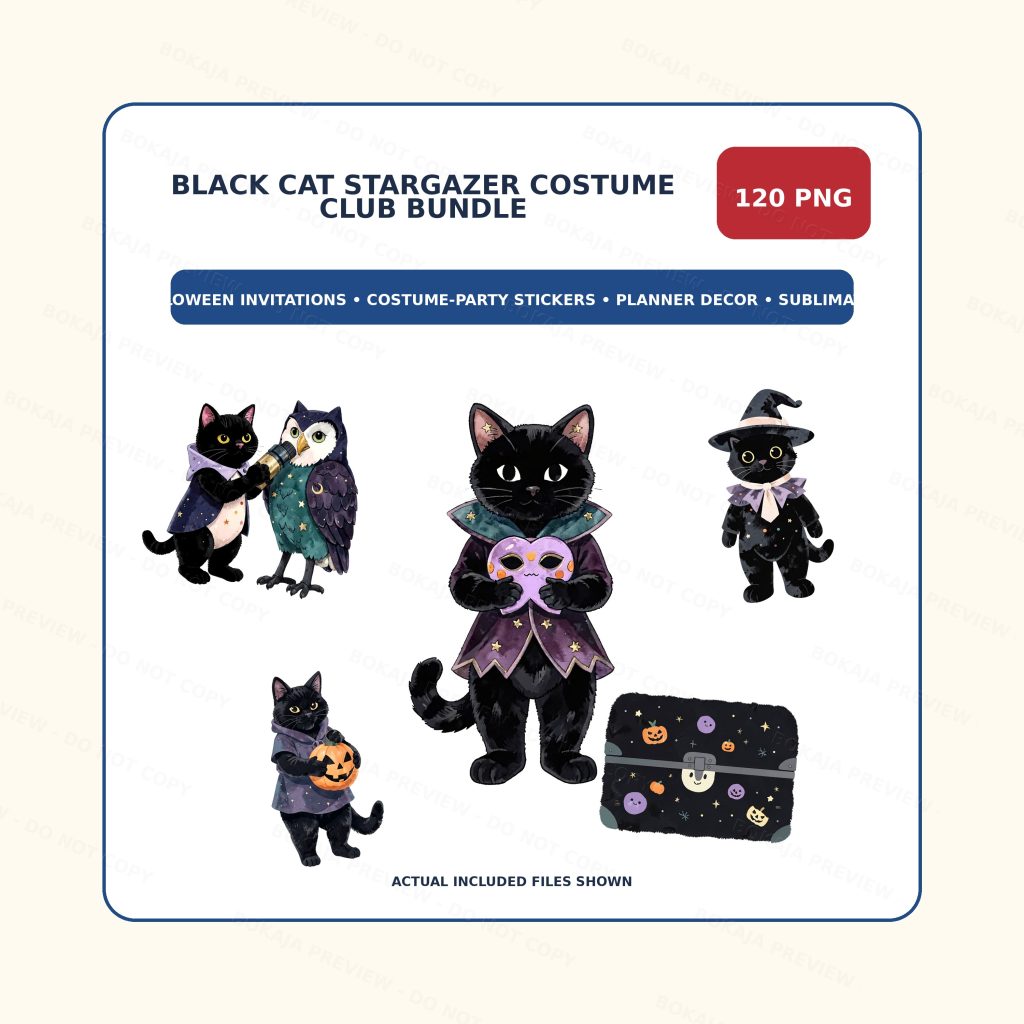
The Black Cat Stargazer Costume Club PNG Bundle is a live, purchasable digital product with 120 transparent PNG graphics, 3072 × 3072 px artwork, and 300 DPI metadata. The collection uses friendly black cats, costume-club details, and celestial Halloween props without named characters, logos, or gore.
PNG graphics are decorative elements, not editable invitation or sign templates. Build event details, voting categories, allergy notes, and labels as live text in Canva or another layout tool. That makes last-minute corrections easier and prevents important words from becoming too small.
Costume-party printable matrix
| Printable | What it communicates | Useful format | Proofing focus |
|---|---|---|---|
| Invitation | Date, time, place, RSVP, costume note | 5 × 7 card or digital image | Every event detail |
| Welcome sign | Party name and entrance cue | A4, US Letter, or larger | Viewing distance |
| Costume ballot | Voting categories and instructions | Quarter-page card | Clear, kind categories |
| Food label | Dish name and allergy information | Folded tent card | Ingredient accuracy |
| Cupcake topper | Repeated visual theme | Small printed circles | Cut margin and food-safe assembly |
| Favor tag | Guest thank-you message | Small tag or sticker | Name and punch-hole space |
| Sticker sheet | Take-home or activity piece | Sticker paper | Small-text readability |
Keep the costume ballot friendly. Categories such as “most creative,” “best handmade detail,” or “brightest celestial style” invite participation without turning the activity into a harsh ranking. Decide in advance whether guests vote, hosts choose, or everyone receives a lighthearted recognition.
Design the invitation before the decorations
The invitation establishes the palette and type hierarchy for every later piece. Start with the date, start and end times, location, RSVP method, costume guidance, and any food or accessibility note. Put that information on a clean background before adding artwork.
Add one black-cat graphic near the title and a small celestial accent near the footer. If the words are difficult to scan, reduce the decoration. Once the invitation is correct, duplicate its colors, heading style, and border treatment for the welcome sign and table pieces.
The DIY birthday party decor guide includes useful principles for building a coordinated event set even though the seasonal theme is different.
Create a clear costume-voting activity
Use one ballot per guest or one group sheet. Write short category names and include a line for the chosen costume or guest name. If children are attending, explain the voting method aloud and keep the number of categories small.
Test the ballot with a pen or pencil before printing the batch. Decorative borders should not reduce the writing space. A moon, star, or cat silhouette in one corner can carry the theme without competing with the activity.
Plan the food-table pieces carefully
Food labels have a practical job. Put the dish name first, then add verified allergy or ingredient information where appropriate. Do not use decorative icons as a substitute for written information. Keep toppers and non-food decorations separate from anything that directly touches food, and choose suitable assembly materials.
For cupcake toppers, leave enough room around each graphic for cutting. Print on cardstock, cut a sample, and assemble with food-safe sticks or another suitable method. The printed piece should decorate the presentation without contacting uncovered food.
Build favors and sticker sheets from the same assets
Favor tags can repeat the invitation’s border, font, and one cat or celestial graphic. Leave room for a punch hole, ribbon, or adhesive area before finalizing the layout. A short thank-you line is easier to read than a long message on a small tag.
For sticker sheets, use transparent graphics over a white or pale backing shape if the artwork disappears against dark paper. Check the Halloween Cricut Print-Then-Cut guide for workflow details, but always follow the current instructions for your own machine and materials.
A simple production timeline
- 1. Seven to ten days before: finalize event details and invitation wording.
- 2. Five to seven days before: design the welcome sign, ballot, food labels, and favor tags.
- 3. Three to five days before: print one complete proof set and correct wording, color, and margins.
- 4. Two to three days before: print and cut the final paper pieces.
- 5. One day before: assemble toppers, tags, signs, and favor items; keep a few blank labels available.
This schedule leaves room for correction. Printer margins, paper color, and cutting alignment can all look different in the physical proof than on screen.
Halloween party checklist
- ☐ Confirm date, time, location, RSVP, and costume wording.
- ☐ Choose one dark neutral and one celestial accent color.
- ☐ Select two or three repeating PNG graphics.
- ☐ Finish the invitation before duplicating the style.
- ☐ Use kind, clear costume-voting categories.
- ☐ Verify every food label and allergy note.
- ☐ Leave safe margins around toppers, tags, and stickers.
- ☐ Print and cut one complete sample set.
- ☐ Assemble paper pieces with suitable materials.
- ☐ Save editable masters separately from print-ready files.
- ☐ Review the Bokaja digital product license before selling finished physical items.
A soft product example
Product example: Use one stargazing cat on the invitation, a moon-and-star accent on the costume ballot, and simplified cat icons on toppers and favor tags. The Black Cat Stargazer Costume Club PNG Bundle supplies a coordinated visual set while all event wording remains editable in your layout.
This is a digital product; no physical party supplies are shipped. For current file-access and support details, visit Digital Downloads and Refunds.
Related Bokaja tutorials
- Halloween Party Printables Checklist
- Halloween Cricut Print-Then-Cut Guide
- Halloween PNG Clipart for Cricut Crafts
- How to Check PNG Transparency and Quality
FAQ
Are these editable Halloween templates?
No. They are transparent PNG graphics. Create the invitation, ballot, labels, and other layouts in your chosen design software and add editable text separately.
How many graphics should I use on one printable?
One main graphic and one small accent are usually enough. Repeat the same few elements across the set to create consistency without crowding the wording.
Can I use black cat graphics on dark paper?
Yes, but add a pale backing shape, outline, or light border so the artwork remains visible. Print a physical proof because screen contrast can differ from the final paper.
Can I sell finished Halloween party pieces?
Review the digital product license first. The original PNG or packaged files may not be resold, shared, uploaded, extracted, or repackaged as digital assets.
Where can I get help with the digital product?
Use the current guidance on the digital downloads and refunds page and include the product URL and order details when contacting support.